
A Director of Technology in Texas put the whole problem in one question. A high school secretary kept clocking out from the elementary school, every afternoon, at pickup time. The app knew when she left. It had no way of knowing where she was standing when she did.
Proof of Presence, Intelligence, and Action
Proof of Presence
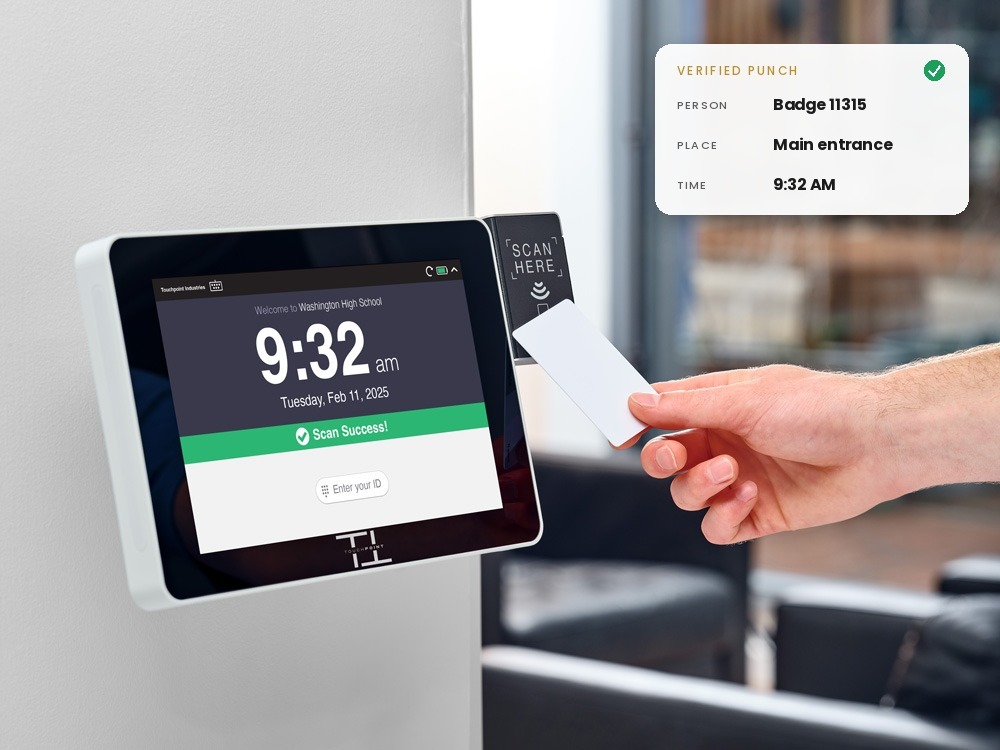
Software knows what should happen. Presence proves what did. Touchpoint creates evidence of what actually happened in the physical world, beginning with whether the right person was at the right place at the right moment, and delivers it to the systems that depend on it.
Confirm the person, the place, and the time at the door. Keep the software you already run. Take the record to an audit.
Where it started
We proved it first with time.
Every payroll dollar rests on a single claim: this person was here, at this place, at this time. The system of record decides what that punch means. It cannot witness the punch. A phone says a button was pressed. A shared Chromebook says a PIN was typed. Paper says whatever was written. Each records time. None proves presence.
So we built the answer, and it has three parts.
01
A device at the place.
Mounted at the door where the work happens. Not in a pocket, not shared across a shift, not dependent on a browser. Location is part of the record, not a guess. When the network drops, the clock keeps capturing.
02
An identity you control.
A credential the district issued to one person, tied to their HR record, and can revoke: the badge already on the lanyard. Not a phone number. Not a PIN that stops being a secret the first time it is shared. Where the stakes justify it, fingerprint or facial verification at the same clock.
03
A record of every attempt.
Successful punches. Badge reads that failed. Punches captured while offline. Every attempt, time-stamped at the door. ClockConnect watches every endpoint we support; Assurance keeps the record. When HR gets the call, the record answers.
Recorded
- Mon7:00 to 3:30
- Tue7:00 to 3:30
- Wed7:00 to 3:30
- Thu7:00 to 3:30
Verified
- Mon 7:02 AMBadge tap · Main entrance
- Mon 3:31 PMBadge tap · Main entrance
- Tue 6:58 AMBadge tap · Main entrance
- Tue 3:29 PMBadge tap · Main entrance
One of these can be checked. A business manager in Pennsylvania learned the difference the expensive way: the district fired someone for falsifying paper timesheets by four hours of overtime, every single day. The process had recorded every hour. It had verified none of them.
That is how we earned the line we still stand behind: the only timeclock you can take to an audit. Time is where we first proved Presence. It is not the boundary of the category.
The category
What a Presence event is.
Not every case needs every element. The category is the connection between a physical-world event and the digital system that has to act on it, made strong enough to hold.
Who
Which person was involved.
Where
At what trusted endpoint or place.
When
The moment it happened, recorded there.
How
Badge, fingerprint, face, credential, device.
What
The physical event that occurred.
Proof
The evidence that supports it later.
Why now
In an age of AI, the first fact matters more, not less.
We are entering a period when anything digital can be generated: a document, a signature, a voice, a record. Software will do more of the work every year, and do it faster than any person can check. Intelligence built on unreliable physical data produces bad conclusions. Autonomous action built on bad conclusions produces bad outcomes.
The one thing no model can manufacture is a person standing at a door, a bus in its bay, a key back in its cabinet. As everything downstream becomes automated, the physical event becomes the anchor. Proof of Presence is what earns the right to build anything on top of it.
How it fits with your software
We are not the museum.
Think of your systems of record as the museum. Everything a district knows lives there, and every decision it makes is made there: who gets paid, who fills the vacancy, who is allowed through which door. Touchpoint is not the museum. Touchpoint is the curator, and a curator of exactly one question: is this piece real? We answer it at the door, before anything goes in.
Inputs
- Badge, face, fingerprint, credential
- Managed endpoint
- Physical location
- Timestamp, captured even offline
Touchpoint: the trust layer
- Verify the identity
- Verify the endpoint
- Associate the place
- Preserve the time
- Create a verified event
Outputs
- Integration or API
- Event record
- File or export
- Audit trail
The time version of the same picture:
The person
Badge on the lanyard
Badge on the lanyard
Touchpoint SmartClock
Proof: person, place, time
Proof: person, place, time
Your time and attendance software
Rules: pay codes, leave, subs, approvals
Rules: pay codes, leave, subs, approvals
Payroll
Clean punches, no reconstruction
Clean punches, no reconstruction
The museum decides what the piece means and where it hangs. We make sure it is genuine, and we raise a hand when something doesn't add up. We do not need to own the museum. We need to make sure nothing hangs in it that isn't real.
Works with Frontline, Red Rover, TCP, and YOSS. Anything else takes a punch file or payroll export. See integrations
Where it goes
Presence is bigger than a punch.
Digital systems need to know more than whether a worker arrived. Every one of these is a version of the same foundational problem, and every one is a place Presence can go.
People
Who entered this building, and when. Whether the contractor was on site for the work that was billed.
Assets
Who received the vehicle, the key, the equipment, and who brought it back.
Places
What is in this room right now. Who is at the site, the yard, the shop.
Events
Arrived, departed, opened, moved, returned, tampered.
Conditions
What just changed, and what state a controlled space is in.
That is the shape of the category, not a promise to build each piece. Some we will build, some we will acquire, some we will enable through others, some we will leave alone.
K-12 is where we proved it, one custodian opening a building before sunrise at a time. The gap between what software says should have happened and what actually happened exists wherever work is done by people who do not sit at a desk: municipal government, public works, transit, facilities, manufacturing, healthcare.
"Bus drivers and electricians, for example, don't have computers in their area, and some don't even know how to use a mouse. Some refuse to do anything with a computer, but this clock is our loophole."
Three layers. One connected system.
Presence, Intelligence, Action.
Presence tells us what happened. Intelligence tells us what it means. Action makes something happen.
01 PRESENCE
What happened
A side door at the middle school opens at 2:14 a.m., in a building that should be empty. The endpoint records it: which door, what time, what happened.
02 INTELLIGENCE
What it means
A door opening at 2 a.m. in an empty building is not normal. Knowing that it matters, and that it is not the custodian's early shift, is Intelligence.
03 ACTION
Make something happen
The one person who can do something about it gets the message before 2:15. A ticket, an alert, an update to another system, or a response back in the physical world.
Touchpoint does all three. This is where AI belongs, not as a label on a sensor or a clock, but as the layer that reads physical evidence that can be believed. We built them in that order, and we will keep building them in that order: physical data first, intelligence second, action last. Each layer is only as sound as the one beneath it.
Where it lands today
Two desks, one clock.
For payroll
Phones lie. Chromebooks die. Touchpoint timeclocks certify.
- Every punch tied to a real person, a real building, and a real time.
- Every attempt documented, including the ones that failed.
- Overtime reporting that rests on verified hours, not reconstructed ones.
"We have paid out an incredible amount of overtime this year. With the SmartClock, it's a more accurate reflection of hours that people are actually working."
For IT
Phones bring pain. Chromebooks clog lanes. Touchpoint timeclocks keep IT sane.
- No personal devices in the loop. Nothing to whitelist, update, or troubleshoot.
- Pre-configured, PoE powered, on the wall and taking punches within minutes.
- Touchpoint watches every supported clock, fixes most issues remotely, and repairs or replaces covered clocks.
"I needed time clocks to stay off my support list rather than add to it."
Built to stay up
Reliability is the product.
A clock only has to fail once, on payday, at the building farthest from IT, to undo a year of goodwill. So we do not sell a device and leave. We build hardware for one job: a seven-plus year device life on the SmartClock Standard, and cellular failover with battery backup on the SmartClock Max for the buildings where the network cannot be trusted. Offline punch activity is still captured when a connection drops.
Every supported clock is watched, and most problems are fixed before anyone in the building notices. Covered clocks are repaired or replaced so no building goes without a working clock. The SmartClock is the accurate financial foundation a district builds everything else on.
"We have 50+ Touchpoint SmartClocks and I have not had a single one fail."
Photo: a clean wall install, single PoE cable, no exposed wires
Where are punches getting lost in your district?
Request a quote and we'll tell you what we'd put at the door: which SmartClock fits, how the punch reaches the time and attendance software you already run, and what it would take to end the missed-punch cleanup there. No purchase order or board vote needed to ask.